Manga AI - AI Comic Generator
Video & Music AI - Create Video & Make SongsComics
4.0174.00 Reviews
- Version
- 2.1.4
- Installs
- 100.00K
- Age Rating
- Teen
Screenshots
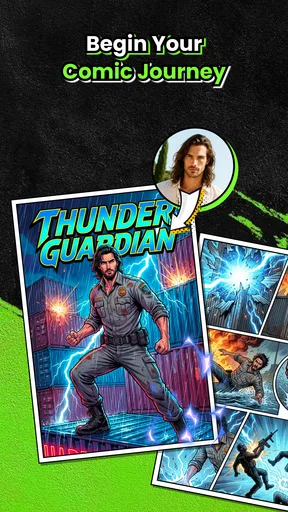
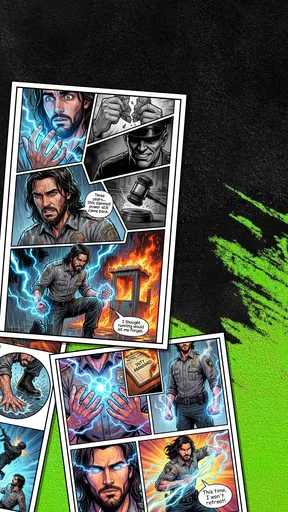
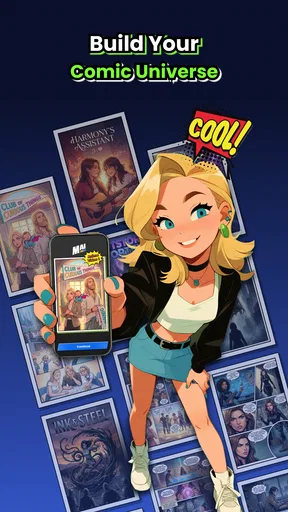
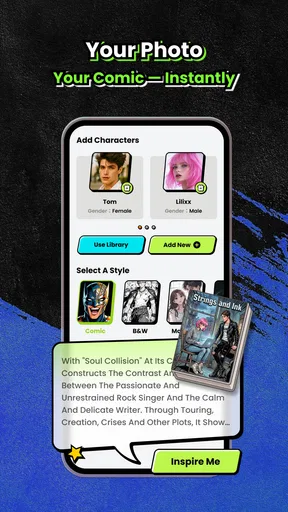
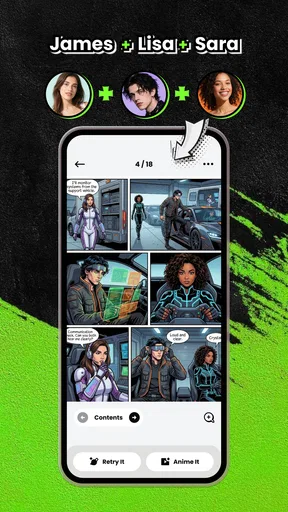
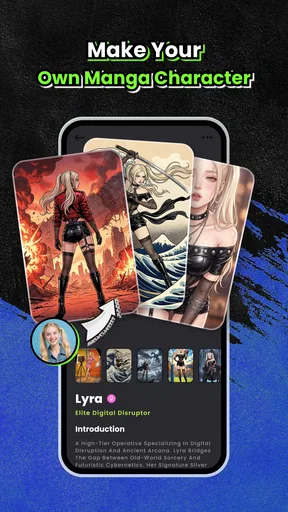
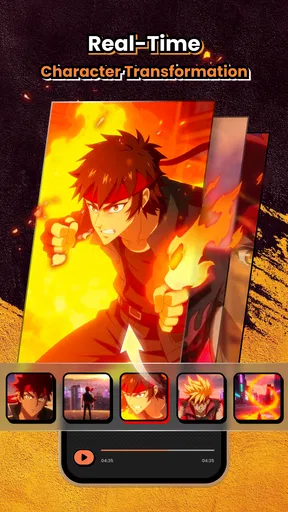
Our Review of Manga AI - AI Comic Generator
 Analysis by Appyee
I like the idea of turning a story into comic panels, but the usual alternatives ask for either drawing practice or time spent arranging art by hand. Manga AI - AI Comic Generator takes a different route: it gives me a way to explore a visual idea through text and images, even when I’m starting with nothing more than a rough scene in my head. That makes it most appealing as a creative sketchpad, not as a shortcut to a polished, finished manga.
Begin with a scene, not a whole saga
My advice is to start small. Instead of asking for an entire story in one go, I’d begin with a single moment that has a clear subject, action, and mood. A short prompt such as a nervous student waiting outside a classroom gives the generator less to juggle than a paragraph introducing several characters, a setting, and a complicated plot twist. Once I have a scene I like, I can build outward and decide what should happen next.
This approach also makes revisions easier to judge. If a result misses the tone, I can change one part of the description rather than rewrite a sprawling prompt. I’d keep notes on details that matter across scenes—hair, clothing, age, and the character’s general manner—so I can reuse consistent descriptions. That doesn’t guarantee a character will look identical every time, but it gives me a more useful starting point than improvising each prompt from scratch.
A practical workflow for a short comic
For a small personal project, I’d first write a three-beat outline: what the character wants, what gets in the way, and what changes by the end. Then I’d turn each beat into one or two visual moments. This prevents the common problem of generating attractive images that don’t actually tell a story. The app can help make a scene visible, but the cause-and-effect still needs to come from the person writing it.
After generating a scene, I’d check whether the image communicates the action without relying on a caption. If it doesn’t, I’d simplify the moment or make the physical action more explicit in the prompt. Only after the image reads clearly would I add dialogue. Keeping speech short is useful here: a long line can crowd a panel and distract from the expressions or action that should carry the scene.
A realistic everyday use would be a writer with a spare half-hour who wants to test whether a scene feels funny, tense, or tender before committing to a longer draft. They could outline a brief exchange, generate a couple of moments, add dialogue, and show the rough result to a friend for feedback. In that role, the app helps turn an abstract idea into something people can react to; it doesn’t need to replace a full illustration workflow to be valuable.
Where the handoff takes work
The creative handoff is between my intention and the generated image. A prompt can be clear to me but still leave room for the AI to interpret the scene in an unexpected way. I’d treat the first result as a draft, then inspect the expression, pose, and background before deciding whether it supports the story. The ability to adjust those elements is useful, though it also means the process may take more than one pass.
There is another handoff when the images become a sequence. A set of individually appealing scenes is not automatically a readable comic. I’d check panel order, shifts in location, and whether a reader can tell who is speaking. Text bubbles and dialogue help add context, but they work best when they clarify the scene rather than explain every visual detail. When the story depends on subtle staging or exact continuity, I’d expect to do more planning and review than the quick-generation idea first suggests.
That distinction matters if you plan to share work beyond a casual experiment. I would read every panel as a reader, not just admire each image on its own. Does the character’s reaction follow from the previous moment? Is the important action easy to spot? Does the dialogue sound like the same person from one panel to the next? Those checks are a small but valuable quality-control step, especially when the app is doing much of the visual lifting.
Who benefits, and who may prefer another tool
I’d recommend trying it if you have story ideas but don’t draw, or if you’re a writer who wants a visual companion while developing characters and scenes. It can also suit someone who enjoys experimenting with different genres and wants to make a quick comic concept without learning a traditional drawing program first. Educators could use a short, guided activity to get students thinking about how image and dialogue work together, while keeping the focus on their own storytelling choices.
I’d skip it as my main tool if I needed precise page composition, repeatable character designs, or fine control over every line and visual detail. A conventional drawing app is a better fit for someone comfortable illustrating and wanting exact control. A page-layout or comic-editing tool may suit a creator who already has finished artwork and mainly needs to arrange panels and lettering. The appeal here is the jump from written idea to generated visual, not the promise that every part of a production pipeline will be handled for me.
What to consider before committing to a project
The app is free to download, but it includes in-app purchases ranging from $4.99 to $79.99 per item. I’d explore the basic creative flow before spending money and consider whether I’m likely to use it regularly. Someone testing a single scene has a different need from a creator who expects to work on a continuing comic. Since the purchase options cover a broad range, it makes sense to check the current in-app choices and their terms before deciding that a larger project depends on them.
It is listed for Everyone, which makes it approachable for a broad audience, but I’d still guide younger users through any creative project and purchases. The app is in the comics category, is developed by Video & Music AI - Create Video & Make Songs, and has a 4.4 average from around 5,500 ratings, with about 120 written reviews. It has over 100,000 installs. Those figures suggest that people are trying it, but they don’t tell me whether its particular workflow suits my own expectations; a short hands-on test is more useful than popularity alone.
The current version is 2.0.7, it was released on December 28, 2025, and it requires Android 8.1 or later. Those details are worth checking against the device I plan to use, especially if I’m hoping to work on a longer story and don’t want to begin on a phone that falls outside the requirement. If I’m comparing it with another comic-making app, I’d focus less on feature counts and more on the kind of control I want: prompt-led image creation here, versus direct drawing or manual panel assembly elsewhere.
What is Manga AI?
Alright, so here's the scoop. Manga AI - AI Comic Generator is an app that leverages the power of artificial intelligence to help you create your own comics. And when I say "create," I mean you can whip up entire scenes without having to pick up a pencil. Sounds like magic, right? Let me tell you, it kind of feels that way.
Getting Started
First things first, setting up the app is a breeze. Once you're in, the interface is pretty straightforward, which is always a plus in my book. You simply enter a few prompts, and the app takes it from there, generating images based on your descriptions. It's like having a mini artist in your pocket.
For instance, I typed in "heroic knight battling a dragon," and voila! The app conjured up a scene that looked like it jumped straight out of a graphic novel. It’s impressive how intuitive and responsive the AI is.
Features That Stand Out
One of the things I really appreciate about Manga AI is its versatility. Whether you're into fantasy, sci-fi, or slice-of-life, the AI is equipped to handle a wide range of themes and styles. This means you can really let your imagination run wild.
Another neat feature is the ability to tweak and customize the images after they're generated. You can adjust the characters’ expressions, poses, and even the background elements to better fit your story. This level of control makes it feel like a collaboration between you and the AI, which is pretty cool.
Creative Freedom
Now, I know what you're thinking: "But isn't AI-generated art a bit... impersonal?" Surprisingly, the app does a great job of infusing personality into its creations. Each scene feels lively and dynamic, which is crucial for storytelling.
Plus, you can add text bubbles and dialogue to really bring your characters to life. This is where you get to flex your creative writing muscles and add that personal touch to your manga.
Who’s It For?
If you're a manga enthusiast who’s always wanted to create but never had the artistic skills, this app is definitely worth checking out. It’s also a fantastic tool for writers who want to visualize their stories or for anyone looking to dabble in comic creation without a huge time investment.
Teachers and educators might find it useful as well. Imagine using this app in a classroom to help students engage with storytelling or visual arts in a new and exciting way. The possibilities are endless.
Final Thoughts
So, what's the verdict? Manga AI - AI Comic Generator is a fun and innovative app that opens up the world of manga creation to just about anyone. It’s not just about the stunning visuals but also the creative process it facilitates. Whether you’re crafting an epic fantasy saga or a quirky slice-of-life story, this app offers the tools to make your vision a reality.
So why not give it a shot? You might just find yourself hooked on creating your own manga masterpieces. And who knows, you might just discover the next big manga artist within you!
Verdict
Strengths of Manga AI - AI Comic Generator
- User-friendly interface for easy navigation.
- Generates high-quality, detailed manga art.
- Offers a variety of AI styles and filters.
- Quick processing for fast results.
- Supports multiple languages for wider reach.
Limitations of Manga AI - AI Comic Generator
- Limited free features; in-app purchases needed.
- Some styles may lack customization options.
- Requires internet connection for full functionality.
- Occasional lag in generating complex scenes.
- Subscription model may not suit casual users.
Other Releases by Video & Music AI - Create Video & Make Songs
View All
Music AI: MV Video Generator
Music & Audio4.5
Similar Picks in This Category
View All
WEBTOON: Manga, Comics, Manhwa
NAVER WEBTOON4.6

MangaToon: Comic & Manga
MangaToon4.3

네이버 웹툰 - Naver Webtoon
NAVER WEBTOON4.3

Tapas – Comics and Novels
Tapas Entertainment Inc.4.2

Lezhin Comics - Daily Releases
LEZHIN ENTERTAINMENT3.3

WebComics - Webtoon & Manga
WEBCOMICS HOLDINGS HK LIMITED4.4
Frequently Asked Questions
What is Manga AI - AI Comic Generator?
Manga AI - AI Comic Generator is an innovative app that allows users to create their own manga and comic strips using artificial intelligence. It provides tools to generate characters, backgrounds, and storylines, making the creation process seamless for both amateurs and seasoned artists alike.
How does the AI work in Manga AI - AI Comic Generator?
The AI in Manga AI - AI Comic Generator utilizes machine learning algorithms to analyze user inputs and generate customized comic elements. Users can input specific prompts or ideas, and the AI will craft corresponding visuals and dialogues, ensuring a coherent and creative comic strip.
Is Manga AI - AI Comic Generator suitable for beginners?
Yes, Manga AI - AI Comic Generator is designed to be user-friendly for beginners. It offers intuitive tools and templates that guide users through the creation process. Even those with no prior experience in drawing or storytelling can easily create appealing manga and comics.
What are the key features of Manga AI - AI Comic Generator?
Key features include AI-generated characters, customizable storylines, a variety of templates, and editing tools for fine-tuning your comics. The app also includes sharing options, enabling users to easily publish their creations on social media or other platforms.
Is there a cost associated with using Manga AI - AI Comic Generator?
Manga AI - AI Comic Generator offers a freemium model. Basic features are available for free, but advanced tools and additional content may require a subscription or one-time purchase. Users can choose a plan that best fits their creative needs and budget.
